Recently we had a requirement to find items having more than one selection in ‘MultilistField’ field along with the display text of these selection.
For this I have written a simple Powershell script that I want to share.
Here I have used a regular expression ‘^({[^}]+}|?){0,1}$’ to find if the ‘MultilistField’ is having more than one selection. This regular expression will match if more than one occurance of “|” is present in selected GUID values. If the regular expression is evaluated to false then there are more than one selection for this field.
[System.Collections.ArrayList]$finalList = @()

# Check if MultilistField contains more than one selection

function CheckItemsForTwoTopic([Sitecore.Data.Items.Item]$contentItem)
{
    $rawIds = [Sitecore.Data.Fields.MultilistField]$contentItem.Fields["Article Topic"]

    if($rawIds.Value -notmatch '^({[^}]+}\|?){0,1}$') {
        $items = $rawIds.GetItems()
        $strArray = $items | Foreach { $_.DisplayName }
        $strJoinedArray  = $strArray -join ', '

        $newObj = [PSCustomObject]@{
                    ID     = $_.ID
                    Path    = $_.Paths.Path
                    Article_Topic_Text     = $strJoinedArray
                }
        $finalList.Add($newObj) | Out-Null
    }
}

# Get all articles with two topics
function GetArticlesWithTwoTopics()
{
    $contentItems = Get-ChildItem -Recurse -Path "\content\Home" `
    | ForEach-Object { CheckItemsForTwoTopic($_) }
}

GetArticlesWithTwoTopics

$finalList | Show-ListView
Output of this script.
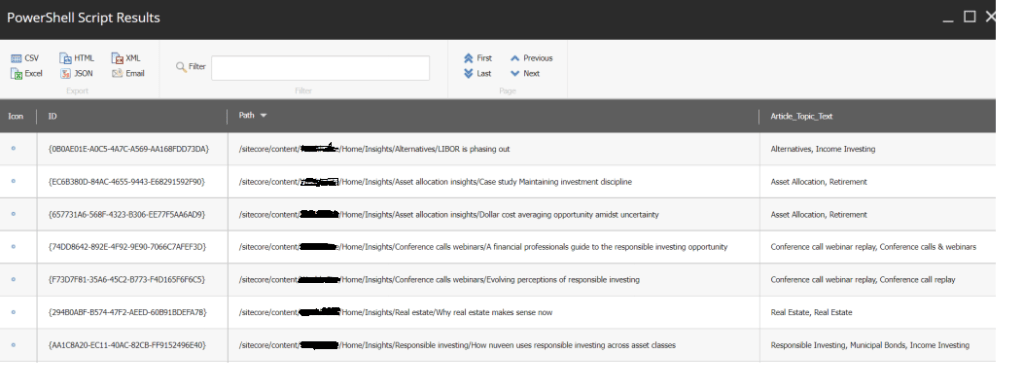
Hope this script may help someone.
 bkhandelwal.tech.blog