We all know that adding new renderings in the Device Editor always places them at the bottom, which could be inconvenient for items with many renderings.
In Sitecore XM cloud, I did a POC using XM Cloud Starter Kit code on my local running on docker to enhance the Device Editor by adding two new buttons, “Move To Top” and “Move To Bottom,” to allow users to easily rearrange renderings on top or bottom.
To do this I used the OOTB DeviceEditorForm class which is a part of the ‘Sitecore.Shell.Applications.Layouts.DeviceEditor‘ namespace and created a new class DeviceEditorFormCustom in a new namespace having all the code of DeviceEditorForm and added logic to move renderings to the top or bottom in response to button clicks.
/// <summary>Gets or sets the move top.</summary>
/// <value>The Move Top button.</value>
protected Button MoveTop { get; set; }

/// <summary>Gets or sets the move bottom.</summary>
/// <value>The Move Bottom button.</value>
protected Button MoveBottom { get; set; }
Initially, make these buttons disabled in the method ‘ChangeButtonsState’
this.MoveTop.Disabled = disable;
this.MoveBottom.Disabled = disable;
Below are the methods to handle the click event of the ‘Move To Top’ and ‘Move To Bottom’ buttons.
/// <summary>Sorts the top.</summary>
/// <param name="message">The message.</param>
[Sitecore.Web.UI.Sheer.HandleMessage("device:movetop")]
protected void MoveToTop(Message message)
{
    Assert.ArgumentNotNull((object)message, nameof(message));
    if (this.SelectedIndex <= 0)
        return;
    LayoutDefinition layoutDefinition = DeviceEditorFormCustom.GetLayoutDefinition();
    ArrayList renderings = layoutDefinition.GetDevice(this.DeviceID).Renderings;
    if (renderings == null || !(renderings[this.SelectedIndex] is RenderingDefinition renderingDefinition))
        return;
    renderings.Remove((object)renderingDefinition);
    renderings.Insert(0, (object)renderingDefinition);
    this.SelectedIndex = 0;
    DeviceEditorFormCustom.SetDefinition(layoutDefinition);
    this.Refresh();
}

/// <summary>Sorts the bottom.</summary>
/// <param name="message">The message.</param>
[Sitecore.Web.UI.Sheer.HandleMessage("device:movebottom")]
protected void MoveToBottom(Message message)
{
    Assert.ArgumentNotNull((object)message, nameof(message));
    LayoutDefinition layoutDefinition = DeviceEditorFormCustom.GetLayoutDefinition();
    ArrayList renderings = layoutDefinition.GetDevice(this.DeviceID).Renderings;
    if (renderings == null || !(renderings[this.SelectedIndex] is RenderingDefinition renderingDefinition))
        return;
    renderings.Remove((object)renderingDefinition);
    renderings.Insert(renderings.Count, (object)renderingDefinition);
    this.SelectedIndex = renderings.Count - 1;
    DeviceEditorFormCustom.SetDefinition(layoutDefinition);
    this.Refresh();
}
The next step is to modify the DeviceEditor.xml file to include the new buttons in the Device Editor interface. To do this I created a new DeviceEditor.xml from the OOTB DeviceEditor.xml. In this XML, I updated ‘Type’ in the ‘CodeBeside’ node to point to a new namespace and assembly name.
<CodeBeside Type="XmCloudSXAStarter.Models.DeviceEditorFormCustom,XmCloudSXAStarter"/>‘XmCloudSXAStarter.Models.DeviceEditorFormCustom’ is the namespace here and ‘XmCloudSXAStarter’ is the assembly name. And added the two buttons under <div class=”optionButtons”>
<Button Header="Move To Top" ID="MoveTop" Click="device:movetop" style="margin-bottom: 6px"/>
<Button Header="Move To Bottom" ID="MoveBottom" Click="device:movebottom" style="margin-bottom: 6px"/>
The ID of buttons is the same as the protected Button type variables created earlier. After this, the two new buttons started coming on the Device Layout.
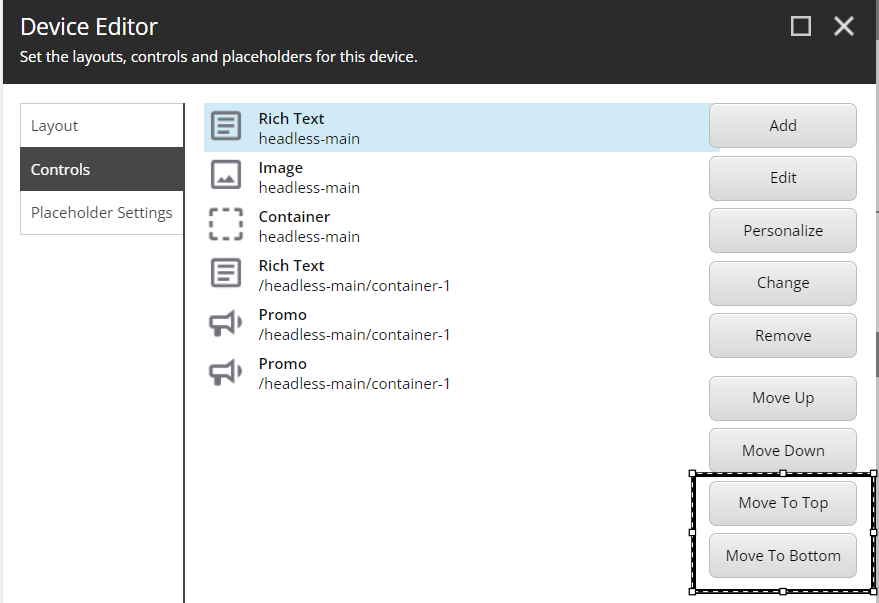
Since I created a new custom DeviceEditor.xml, I placed this file in the folder ‘\docker\deploy\platform\sitecore\shell\Override’, my local XM cloud is running on docker, and the platform is the CM here.
Now it was time to verify the changes but when I clicked on any of the renderings in Device Editor I got the error.
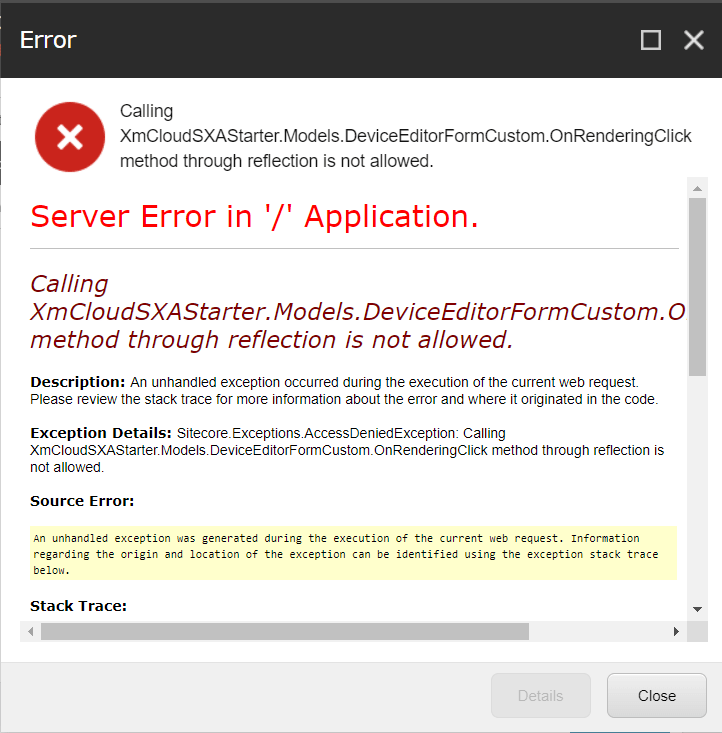
There might be a hotfix that added a security layer that prevents the execution of unexpected methods through reflection. Since I have customized the code I got this error.
To fix this issue I created a new Sitecore.Reflection.Filtering_Custom.config file and placed this file in the folder ‘\docker\deploy\platform\App_Config\Sitecore\CMS.Core’.
I added a new descriptor pointing to my namespace and assembly name in this config file.
<configuration xmlns:patch="http://www.sitecore.net/xmlconfig/">
  <sitecore>
	<reflection>
		<allowedMethods>
				<descriptor type="XmCloudSXAStarter.Models.DeviceEditorFormCustom" methodName="OnRenderingClick" assemblyName="XmCloudSXAStarter" hint="OnRenderingClick"/>
		</allowedMethods>
	</reflection>
   </sitecore>
</configuration>
After addressing the security issue, the customization started working as intended.
Hope this might help someone !!.
 bkhandelwal.tech.blog