Today, I’d like to share an error I encountered while migrating Sitecore XP 9.1 templates to Sitecore XM Cloud (XMC).
After successfully migrating the templates, I attempted to run the Layout Service using GraphQL IDE, but encountered the following error:

{
  "error": "Unexpected token '<', \"<!DOCTYPE \"... is not valid JSON"
}
At first glance, there was nothing wrong with the syntax of the layout query, so I started investigating the root cause.
Troubleshooting Steps
Since the templates were migrated from Sitecore 9.1 to Sitecore XM Cloud, I suspected there might be an issue within the migrated templates themselves. I reviewed the template schemas, and everything appeared to be in order.
To dig deeper, I created a PowerShell script to export all user-defined fields from the templates. After exporting the field data, I compared each field name against the properties defined in the GraphQL schema.
During this comparison, I discovered that one of the templates had a field named “languages”.

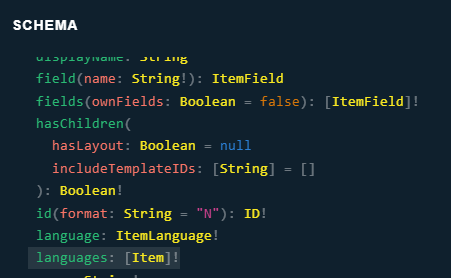
Interestingly, “languages” is also a reserved field name in the GraphQL schema for the Item interface.
The Fix
I renamed the field “languages” in my template to something else. After making this change, the GraphQL layout query returned the expected result without any error.
Lesson Learned
This issue highlighted an important point: we should avoid using field names in Sitecore XM Cloud templates that conflict with non-null object types defined in the GraphQL schema.
For example, here’s a snippet from the GraphQL Item interface schema:
interface Item {
  ancestors(
    hasLayout: Boolean = null
    includeTemplateIDs: [String] = []
  ): [Item]!
  children(
    hasLayout: Boolean = null
    includeTemplateIDs: [String] = []
    first: Int = null
    after: String = null
  ): ItemSearchResults
  displayName: String
  field(name: String!): ItemField
  fields(ownFields: Boolean = false): [ItemField]!
  hasChildren(
    hasLayout: Boolean = null
    includeTemplateIDs: [String] = []
  ): Boolean!
  id(format: String = "N"): ID!
  language: ItemLanguage!
  languages: [Item]!
  name: String!
  parent: Item
  path: String!
  personalization: ItemPersonalization
  rendered: JSON!
  template: ItemTemplate!
  url: ItemUrl!
  version: Int!
}
Fields like ancestors, languages, and rendered are non-null object types. If your templates define fields with these names, they can conflict with the GraphQL schema and result in unexpected errors.
Recommendation
Always review the GraphQL schema when naming fields in Sitecore XM Cloud templates to avoid conflicts with reserved keywords or object types.
 bkhandelwal.tech.blog