When migrating from Sitecore XP to XM Cloud we encountered some issues – particularly when dealing with device-specific renderings. While Sitecore XP supported multiple devices (Mobile, Desktop, Custom devices, etc.) for rendering different layouts, Sitecore XM Cloud only supports the ‘Default’ device in GraphQL queries and Layout Service responses.
This limitation created a migration challenge: how do we preserve device-specific rendering logic when moving content from XP to XM Cloud?
The Migration Problem
During our content migration project, we encountered a common scenario where legacy XP implementations had:
- Renderings assigned to the ‘Mobile’ device for mobile-specific layouts.
- Renderings assigned to custom devices like ‘Services’ or ‘CustomData’ for specialized content delivery.
- Different rendering configurations across devices for the same content items.
Since XM Cloud’s headless architecture only recognizes the ‘Default’ device, all these device-specific renderings never showed up in XM Cloud’s GraphQL responses.
The Solution: PowerShell-Based Device Migration
First I created a Rendering Parameter Template having shared checkbox type fields
- IsUsedInMobileDevice – Set to true if rendering moved / updated from Mobile device to Default device
- IsUsedInServicesDevice- Set to true if rendering moved / updated from Service device to Default device
- IsUsedInCustomDataDevice – Set to true if rendering moved / updated from Custom device to Default device
And attached this Rendering Parameter Template with all the renderings.
Secondly, I developed a comprehensive PowerShell script that intelligently migrates device-specific renderings to the Default device while preserving their original intent through parameter-based flags.
How It Works
The script follows a smart migration strategy:
- Identifies Source Renderings: Scans specified device types (Mobile, CustomData, Services) for existing renderings
- Compares with Default Device: Checks if similar renderings exist on the Default device
- Updates or Adds: Either updates existing renderings or adds new ones based on matching criteria
- Preserves Context: Maintains device-specific behavior through parameter flags
Key Features
1. Multi-Language Support
The script processes all target languages defined in the configuration:
$targetLanguages = @("en", "ar")2. Device Parameter Mapping
Each device type is mapped to a specific parameter that indicates its original usage:
$DeviceParameterMapping = @{
    "Mobile" = "IsUsedInMobileDevice"
    "CustomData" = "IsUsedInCustomDataDevice"
    "Services" = "IsUsedInServicesDevice"
}
3. Intelligent Matching Logic
The script uses below matching:
- Basic Match: Same rendering, placeholder, and datasource.
4. Layout Service Integration
When new renderings are added, the script automatically updates the Layout Service Placeholders field to ensure proper headless rendering support.
Migration Process Flow
- Scan Source Device: Identify all renderings on the specified device (Mobile, CustomData, Services)
- Compare with Default: Check existing renderings on the Default device
- Decision Logic:
- If a match exists: Update the Default device rendering with the device-specific parameter (e.g., IsUsedInMobileDevice=1)
- If no match exists: Add the rendering to the Default device with the appropriate parameter (e.g., IsUsedInMobileDevice=1)
- Placeholder Management: Ensure placeholder definitions exist in the layout for new renderings
- Validation: Verify parameter template support for device-specific parameters
Example Usage
# Migrate Mobile device renderings
Migrate-RenderingsToDefault -SourceDeviceType "Mobile" -ParentItemPath "master:/sitecore/content/<SITE_COLLECTION_NAME>/<SITE_NAME>/Home"

# Migrate Custom Data device renderings
Migrate-RenderingsToDefault -SourceDeviceType "CustomData" -ParentItemPath "master:/sitecore/content/<SITE_COLLECTION_NAME>/<SITE_NAME>/Home"

# Migrate Services device renderings
Migrate-RenderingsToDefault -SourceDeviceType "Services" -ParentItemPath "master:/sitecore/content/<SITE_COLLECTION_NAME>/<SITE_NAME>/Home"
Technical Implementation Highlights
Safe Parameter Handling
The script includes robust parameter cloning to avoid reference issues:
function Clone-Parameters {
    param($originalParameters)

    if ($originalParameters -eq $null) {
        return @{}
    }

    $clonedParams = @{}
    foreach ($key in $originalParameters.Keys) {
        $clonedParams[$key] = $originalParameters[$key]
    }
    return $clonedParams
}
Placeholder GUID Management
Automatic placeholder resolution ensures proper layout service integration:
function Get-PlaceholderGuid {
    param($placeholderName)

    $placeholderItems = Get-ChildItem -Path "master:/sitecore/layout/Placeholder Settings/Project/<SITE_COLLECTION_NAME>/<SITE_NAME>" -Recurse |
                       Where-Object { $_.TemplateID -eq "{5C547D4E-7111-4995-95B0-6B561751BF2E}" }

    $matchingPlaceholder = $placeholderItems | Where-Object { $_.Name -eq $placeholderName }

    if ($matchingPlaceholder) {
        return $matchingPlaceholder.ID.ToString()
    }

    return $null
}
Error Handling and Logging
Comprehensive error handling ensures migration reliability:
- Detailed logging for each operation
- Rollback capabilities for failed updates
- Status tracking for all processed items
Benefits of This Approach
- Preserves Device Logic: Device-specific rendering behavior is maintained through parameter flags
- Maintains Content Integrity: All renderings are preserved, nothing is lost during migration
- Automated Process: Reduces manual migration effort and human error
- Multi-Language Compatible: Handles complex multi-language Sitecore implementations
- Comprehensive Reporting: Provides detailed migration reports for validation
Integration
After migration, any platform can utilize the device parameters:
// Example: Check if rendering should be displayed on mobile

if (rendering.parameters.IsUsedInMobileDevice === '1') {

    // Render mobile-specific layout

}

// Example: Check for custom data rendering

if (rendering.parameters.IsUsedInCustomDataDevice === '1') {

    // Apply custom data formatting

}
Complete Script
# This script migrates device renderings to the default device.
# It checks for existing renderings and updates them if they match, or adds new ones if they don't.
# For the match we are checking the rendering ID, placeholder and datasource.
# *** NEW: Define the target languages ***
$targetLanguages = @("en", "ar")
# Device configuration mapping
$DeviceParameterMapping = @{
"Mobile" = "IsUsedInMobileDevice"
"CustomData" = "IsUsedInCustomDataDevice"
"Services" = "IsUsedInServicesDevice"
}
# Helper function to clone parameters hashtable
function Clone-Parameters {
param($originalParameters)
if ($originalParameters -eq $null) {
return @{}
}
$clonedParams = @{}
foreach ($key in $originalParameters.Keys) {
$clonedParams[$key] = $originalParameters[$key]
}
return $clonedParams
}
# Helper function to create a unique key for exact rendering comparison (including parameters)
function Get-ExactRenderingKey {
param($rendering)
# Sort parameters to ensure consistent comparison
$paramString = ""
if ($rendering.AllParameters -and $rendering.AllParameters.Count -gt 0) {
$sortedParams = $rendering.AllParameters.GetEnumerator() | Sort-Object Key
$paramString = ($sortedParams | ForEach-Object { "$($_.Key)=$($_.Value)" }) -join ";"
}
return "$($rendering.RenderingId)|$($rendering.Placeholder)|$($rendering.Datasource)|$paramString"
}
# Helper function to create a basic key for rendering identification (without parameters)
function Get-BasicRenderingKey {
param($rendering)
return "$($rendering.RenderingId)|$($rendering.Placeholder)|$($rendering.Datasource)"
}
# Helper function to get placeholder GUID by name
function Get-PlaceholderGuid {
param($placeholderName)
try {
# Get all placeholder settings under the specified path
$placeholderItems = Get-ChildItem -Path "master:/sitecore/layout/Placeholder Settings/Project/<SITE_COLLECTION_NAME>/<SITE_NAME>" -Recurse |
Where-Object { $_.TemplateID -eq "{5C547D4E-7111-4995-95B0-6B561751BF2E}" }
# Find the placeholder by name
$matchingPlaceholder = $placeholderItems | Where-Object { $_.Name -eq $placeholderName }
if ($matchingPlaceholder) {
return $matchingPlaceholder.ID.ToString()
}
Write-Warning "Placeholder '$placeholderName' not found in placeholder settings"
return $null
}
catch {
Write-Error "Error getting placeholder GUID: $($_.Exception.Message)"
return $null
}
}
# Helper function to update Layout Service Placeholders field
function Update-LayoutServicePlaceholders {
param(
$LayoutItem,
$PlaceholderGuid
)
try {
if (-not $LayoutItem -or -not $PlaceholderGuid) {
return $false
}
# Get current Layout Service Placeholders field value
$currentValue = $LayoutItem.Fields["Placeholders"].Value
# Check if the GUID is already present
if ($currentValue -and $currentValue.Contains($PlaceholderGuid)) {
Write-Host " Placeholder GUID already exists in Layout Service Placeholders field" -ForegroundColor Yellow
return $true
}
# Append the GUID with pipe separator
$newValue = if ([string]::IsNullOrEmpty($currentValue)) {
$PlaceholderGuid
} else {
"$currentValue|$PlaceholderGuid"
}
# Update the field
$LayoutItem.Editing.BeginEdit()
$LayoutItem.Fields["Placeholders"].Value = $newValue
$LayoutItem.Editing.EndEdit()
Write-Host " Successfully updated Layout Service Placeholders field" -ForegroundColor Green
return $true
}
catch {
Write-Error " Failed to update Layout Service Placeholders: $($_.Exception.Message)"
if ($LayoutItem.Editing.IsEditing) {
$LayoutItem.Editing.CancelEdit()
}
return $false
}
}
# Helper function to find matching layout and update placeholders
function Process-LayoutPlaceholders {
param(
$TargetItem,
$PlaceholderName
)
try {
Write-Host " Processing layout placeholders for: $PlaceholderName" -ForegroundColor Cyan
# Get the default device (usually the first one in /sitecore/layout/Devices)
$defaultDevice = Get-Item "master:/sitecore/layout/Devices/Default"
# Load existing layout definition or create a new one
$layoutField = [Sitecore.Data.Fields.LayoutField]$TargetItem.Fields["__Renderings"]
$layoutDefinition = if ($layoutField.Value -ne "") {
[Sitecore.Layouts.LayoutDefinition]::Parse($layoutField.Value)
} else {
New-Object Sitecore.Layouts.LayoutDefinition
}
# Create or update the device definition
$deviceDefinition = $layoutDefinition.GetDevice($defaultDevice.ID.ToString())
if (-not $deviceDefinition) {
Write-Warning " No device definition found for Default device"
return $false
}
# Get the layout ID from the device definition
$layoutId = $deviceDefinition.Layout
if (-not $layoutId -or $layoutId -eq "{00000000-0000-0000-0000-000000000000}") {
Write-Warning " No layout ID found in device definition"
return $false
}
Write-Host " Found layout ID: $layoutId" -ForegroundColor Gray
# Get all layout items under the specified path
$layoutItems = Get-ChildItem -Path "master:/sitecore/layout/Layouts/Project/<SITE_COLLECTION_NAME>/<SITE_NAME>" -Recurse
# Get placeholder GUID
$placeholderGuid = Get-PlaceholderGuid -placeholderName $PlaceholderName
if (-not $placeholderGuid) {
Write-Warning " Could not find GUID for placeholder: $PlaceholderName"
return $false
}
Write-Host " Found placeholder GUID: $placeholderGuid" -ForegroundColor Gray
# Find matching layout item
$matchingLayout = $layoutItems | Where-Object { $_.ID.ToString() -eq $layoutId }
if ($matchingLayout) {
Write-Host " Found matching layout: $($matchingLayout.Name)" -ForegroundColor Blue
# Update the Layout Service Placeholders field
if (Update-LayoutServicePlaceholders -LayoutItem $matchingLayout -PlaceholderGuid $placeholderGuid) {
Write-Host " Successfully updated layout placeholders" -ForegroundColor Green
return $true
} else {
Write-Warning " Failed to update layout placeholders"
return $false
}
} else {
Write-Warning " No matching layout found with ID: $layoutId"
return $false
}
}
catch {
Write-Error " Error processing layout placeholders: $($_.Exception.Message)"
return $false
}
}
# Helper function to safely add rendering variant
function Add-RenderingVariant {
param(
$TargetItem,
$RenderingId,
$Placeholder,
$Datasource,
$Parameters,
$DeviceParameterName,
$DeviceName = "Default"
)
try {
Write-Host "Adding a NEW rendering variant: $RenderingId to placeholder: $Placeholder" -ForegroundColor Green
Write-Host " Datasource: $Datasource" -ForegroundColor Gray
# Get the rendering definition item
$renderingDefItem = Get-Item -Path "master:" -ID $RenderingId -ErrorAction Stop
# Create new rendering instance
$newRenderingInstance = New-Rendering -Item $renderingDefItem
# Clone parameters to avoid reference issues
$safeParameters = Clone-Parameters -originalParameters $Parameters
# Add the device indicator parameter
$safeParameters[$DeviceParameterName] = "1"
# Get the target device for the new rendering
$devices = Get-ChildItem "master:/sitecore/layout/Devices" -Recurse | Where-Object { $_.Name -eq 'Default' }
$targetDevice = $devices | Where-Object { $_.Name -eq $DeviceName }
if ($null -eq $targetDevice) {
$targetDevice = $devices | Where-Object { $_.Name -eq "Default" }
}
# Add the rendering to the item
Add-Rendering -Item $TargetItem -Instance $newRenderingInstance -PlaceHolder $Placeholder -Parameter $safeParameters -DataSource $Datasource -Device $targetDevice -FinalLayout
Write-Host "Successfully added rendering variant to $DeviceName device" -ForegroundColor Green
# Process layout placeholders if rendering was added successfully
$placeholderProcessed = Process-LayoutPlaceholders -TargetItem $TargetItem -PlaceholderName $Placeholder
if ($placeholderProcessed) {
Write-Host "Layout placeholders processed successfully" -ForegroundColor Green
} else {
Write-Warning "Layout placeholders processing failed or no updates needed"
}
return $true
}
catch {
Write-Error "Failed to add rendering variant: $($_.Exception.Message)"
return $false
}
}
# Helper function to update existing rendering
function Update-ExistingRendering {
param(
$SourceRenderingInstance,
$RenderingItem,
$TargetItem,
$RenderingId,
$DeviceParameterName,
$MatchingDefaultRendering
)
try {
$setDeviceParameter = "false"
if (-not ([string]::IsNullOrEmpty($RenderingItem.Fields["Parameters Template"].Value))) {
# Get the parameter template
$parameterTemplateItem = Get-Item -Path "master:" -ID $RenderingItem.Fields["Parameters Template"].Value -ErrorAction SilentlyContinue
if ($null -ne $parameterTemplateItem) {
# if this is not used directly
if ($parameterTemplateItem.ID -ne "{492CEE00-CB5D-47DE-9C35-E29FB6445F17}") {
# if it has inherited
if ($parameterTemplateItem.Fields["__Base template"].Value.Contains("{492CEE00-CB5D-47DE-9C35-E29FB6445F17}")) {
$setDeviceParameter = "true"
}
}
elseif ($parameterTemplateItem.ID -eq "{492CEE00-CB5D-47DE-9C35-E29FB6445F17}") { # if this is used directly
$setDeviceParameter = "true"
}
}
}
if ($setDeviceParameter -eq "true") {
Write-Host "Updating existing rendering: $($RenderingItem.ID)" -ForegroundColor Blue
# Use the matching default rendering instance instead of searching again
$defaultRenderingInstance = $MatchingDefaultRendering.rendering
# Get current parameters from the DEFAULT device rendering
$allParameters = Get-RenderingParameter -Rendering $defaultRenderingInstance
# Clone existing parameters to avoid reference issues
$updateParameters = Clone-Parameters -originalParameters $allParameters
# Add or update the device indicator while preserving existing parameters
$updateParameters[$DeviceParameterName] = "1"
# Update the DEFAULT device rendering parameters (not the source device rendering)
$defaultRenderingInstance | Set-RenderingParameter -Parameter $updateParameters
Set-Rendering -Item $TargetItem -Instance $defaultRenderingInstance -FinalLayout
Write-Host "Successfully updated DEFAULT device rendering parameters with $DeviceParameterName = 1" -ForegroundColor Green
return $true
} else {
Write-Host "Skipping update - rendering doesn't support device parameters" -ForegroundColor Yellow
return $false
}
}
catch {
Write-Warning "Failed to update rendering: $($_.Exception.Message)"
return $false
}
}
# Main function to migrate renderings from source device to default
function Migrate-RenderingsToDefault {
param(
[Parameter(Mandatory = $true)]
[ValidateSet("Mobile", "CustomData", "Services")]
[string]$SourceDeviceType,
[Parameter(Mandatory = $true)]
[string]$ParentItemPath
)
Write-Host "Starting migration from $SourceDeviceType device to Default device" -ForegroundColor Cyan
Write-Host "Parent item path: $ParentItemPath" -ForegroundColor Gray
Write-Host "Target item ID: $TargetItemId" -ForegroundColor Gray
# Get the device parameter name for this device type
$DeviceParameterName = $DeviceParameterMapping[$SourceDeviceType]
if (-not $DeviceParameterName) {
Write-Error "Unknown device type: $SourceDeviceType"
return
}
Write-Host "Device parameter name: $DeviceParameterName" -ForegroundColor Gray
# *** NEW: Process each target language ***
foreach ($language in $targetLanguages) {
Write-Host "`n========================================" -ForegroundColor Magenta
Write-Host "Processing language: $language" -ForegroundColor Magenta
Write-Host "========================================" -ForegroundColor Magenta
try {
# *** NEW: Set the language context ***
$currentLanguage = [Sitecore.Globalization.Language]::Parse($language)
[Sitecore.Context]::SetLanguage($currentLanguage, $true)
$finalResults = @()
# *** UPDATED: Get the parent item with language parameter ***
$parentItem = Get-Item -Path $ParentItemPath -Language $language -ErrorAction SilentlyContinue
if (-not $parentItem) {
Write-Host "Parent item not found at path: $ParentItemPath for language: $language" -ForegroundColor Red
Write-Host "Getting Parent item at path: $ParentItemPath for language en" -ForegroundColor Red
$parentItem = Get-Item -Path $ParentItemPath -Language 'en' -ErrorAction SilentlyContinue
if (-not $parentItem) {
continue
}
}
# Get all layout devices
$devices = Get-ChildItem "master:/sitecore/layout/Devices" -Recurse | Where-Object { $_.Name -eq 'Default' -OR $_.Name -eq $SourceDeviceType }
if ($devices.Count -lt 2) {
Write-Host "Required devices (Default and $SourceDeviceType) not found for language: $language" -ForegroundColor Red
continue
}
# *** UPDATED: Get all child items with language parameter ***
$childItems = Get-ChildItem -Path $parentItem.Paths.Path -Language $language
foreach ($item in $childItems) {
# Check if this is the target item
if ($item) {
$itemPath = $item.Paths.FullPath
Write-Host "Processing item: $($item.Name) for language: $language" -ForegroundColor Yellow
# Get the value of the __Renderings field
$renderingsXml = $item."__Renderings"
# Check if the __Renderings field has a value
if ([string]::IsNullOrEmpty($renderingsXml) -or $renderingsXml -eq "<r />") {
Write-Host "Item '$($item.Name)' at '$($item.Paths.FullPath)' does NOT have presentation details for language: $language."
continue
}
# Clear arrays for this item
$finalResults = @()
# Collect renderings from both devices
$defaultRenderings = @()
$sourceRenderings = @()
foreach ($device in $devices) {
$renderings = Get-Rendering -Item $item -Device $device -FinalLayout
foreach ($rendering in $renderings) {
$allParameters = Get-RenderingParameter -Instance $rendering
$renderingObj = [PSCustomObject]@{
ItemId = $item.Id
ItemPath = $itemPath
RenderingId = $rendering.ItemID
DeviceName = $device.Name
Placeholder = $rendering.Placeholder
Datasource = $rendering.Datasource
AllParameters = $allParameters
rendering = $rendering
ExactKey = Get-ExactRenderingKey -rendering @{
RenderingId = $rendering.ItemID
Placeholder = $rendering.Placeholder
Datasource = $rendering.Datasource
AllParameters = $allParameters
}
BasicKey = Get-BasicRenderingKey -rendering @{
RenderingId = $rendering.ItemID
Placeholder = $rendering.Placeholder
Datasource = $rendering.Datasource
}
}
# Separate by device
if ($device.Name -eq "Default") {
$defaultRenderings += $renderingObj
} elseif ($device.Name -eq $SourceDeviceType) {
$sourceRenderings += $renderingObj
}
}
}
Write-Host "Found $($defaultRenderings.Count) renderings on Default device for language: $language" -ForegroundColor Cyan
Write-Host "Found $($sourceRenderings.Count) renderings on $SourceDeviceType device for language: $language" -ForegroundColor Cyan
# Create lookup tables for Default device renderings
$defaultExactKeys = @{} # For exact matches (same parameters)
$defaultBasicKeys = @{} # For basic matches (same rendering+placeholder+datasource)
foreach ($defaultRendering in $defaultRenderings) {
$defaultExactKeys[$defaultRendering.ExactKey] = $defaultRendering
$defaultBasicKeys[$defaultRendering.BasicKey] = $defaultRendering
}
# Process each source device rendering
$updateCount = 0
$addCount = 0
$skipCount = 0
foreach ($sourceRendering in $sourceRenderings) {
Write-Host "`nProcessing $SourceDeviceType rendering: $($sourceRendering.RenderingId) for language: $language" -ForegroundColor Magenta
Write-Host " Placeholder: $($sourceRendering.Placeholder)" -ForegroundColor Gray
Write-Host " Datasource: $($sourceRendering.Datasource)" -ForegroundColor Gray
# Check for basic match (same rendering + placeholder + datasource)
if ($defaultBasicKeys.ContainsKey($sourceRendering.BasicKey)) {
Write-Host " → MATCH found - UPDATING existing DEFAULT device rendering" -ForegroundColor Blue
# Get the matching default rendering object
$matchingDefaultRendering = $defaultBasicKeys[$sourceRendering.BasicKey]
$renderingItem = Get-Item -Path "master:" -ID $sourceRendering.RenderingId -ErrorAction SilentlyContinue
if ($renderingItem -and (Update-ExistingRendering -SourceRenderingInstance $sourceRendering.rendering -RenderingItem $renderingItem -TargetItem $item -RenderingId $sourceRendering.RenderingId -DeviceParameterName $DeviceParameterName -MatchingDefaultRendering $matchingDefaultRendering)) {
$updateCount++
$finalResults += [PSCustomObject]@{
ItemId = $sourceRendering.ItemId
ItemPath = $sourceRendering.ItemPath
RenderingId = $sourceRendering.RenderingId
Placeholder = $sourceRendering.Placeholder
Datasource = $sourceRendering.Datasource
DeviceName = "Default"
Language = $language # *** NEW: Added language tracking ***
Action = "Updated"
Status = "Success"
Reason = "Match found - parameter $DeviceParameterName set to 1"
}
} else {
$skipCount++
$finalResults += [PSCustomObject]@{
ItemId = $sourceRendering.ItemId
ItemPath = $sourceRendering.ItemPath
RenderingId = $sourceRendering.RenderingId
Placeholder = $sourceRendering.Placeholder
Datasource = $sourceRendering.Datasource
DeviceName = "Default"
Language = $language # *** NEW: Added language tracking ***
Action = "Skipped"
Status = "Update Failed"
Reason = "No device support or error occurred"
}
}
}
# Completely new rendering (different placeholder or datasource)
else {
Write-Host " → NEW rendering - ADDING to Default device" -ForegroundColor Green
$renderingItem = Get-Item -Path "master:" -ID $sourceRendering.RenderingId -ErrorAction SilentlyContinue
if ($renderingItem -and (Add-RenderingVariant -TargetItem $item -RenderingId $sourceRendering.RenderingId -Placeholder $sourceRendering.Placeholder -Datasource $sourceRendering.Datasource -Parameters $sourceRendering.AllParameters -DeviceParameterName $DeviceParameterName -DeviceName "Default")) {
$addCount++
$finalResults += [PSCustomObject]@{
ItemId = $sourceRendering.ItemId
ItemPath = $sourceRendering.ItemPath
RenderingId = $sourceRendering.RenderingId
Placeholder = $sourceRendering.Placeholder
Datasource = $sourceRendering.Datasource
DeviceName = "Default"
Language = $language # *** NEW: Added language tracking ***
Action = "Added"
Status = "Success"
Reason = "New rendering added with $DeviceParameterName = 1"
}
} else {
$skipCount++
$finalResults += [PSCustomObject]@{
ItemId = $sourceRendering.ItemId
ItemPath = $sourceRendering.ItemPath
RenderingId = $sourceRendering.RenderingId
Placeholder = $sourceRendering.Placeholder
Datasource = $sourceRendering.Datasource
DeviceName = "Default"
Language = $language # *** NEW: Added language tracking ***
Action = "Skipped"
Status = "Add Failed"
Reason = "Error occurred while adding rendering"
}
}
}
}
Write-Host "`nMigration Summary for $($item.Name) - Language: $language" -ForegroundColor Yellow
Write-Host " - Updated existing renderings: $updateCount" -ForegroundColor Blue
Write-Host " - Added new renderings/variants: $addCount" -ForegroundColor Green
Write-Host " - Skipped (errors): $skipCount" -ForegroundColor Red
}
}
# Display results for this language
if ($finalResults.Count -gt 0) {
Write-Host "`nFinal Results for Language: $language" -ForegroundColor Yellow
$finalResults | Format-Table -Property Action, Status, RenderingId, Placeholder, Datasource, Language, Reason -AutoSize
$finalResults | Show-ListView
}
else {
Write-Host "No operations were performed for language: $language" -ForegroundColor Yellow
}
}
catch {
Write-Error "Error processing language $language : $($_.Exception.Message)"
continue
}
}
Write-Host "`n========================================" -ForegroundColor Magenta
Write-Host "Migration from $SourceDeviceType to Default completed for ALL languages." -ForegroundColor Cyan
Write-Host "========================================" -ForegroundColor Magenta
}
# Example usage:
# Migrate-RenderingsToDefault -SourceDeviceType "Mobile" -ParentItemPath "master:/sitecore/content/<SITE_COLLECTION_NAME>/<SITE_NAME>/Home"
# Migrate-RenderingsToDefault -SourceDeviceType "CustomData" -ParentItemPath "master:/sitecore/content/<SITE_COLLECTION_NAME>/<SITE_NAME>/Home"
# Migrate-RenderingsToDefault -SourceDeviceType "Services" -ParentItemPath "master:/sitecore/content/<SITE_COLLECTION_NAME>/<SITE_NAME>/Home"After running the script, below are the result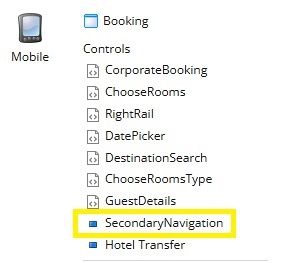
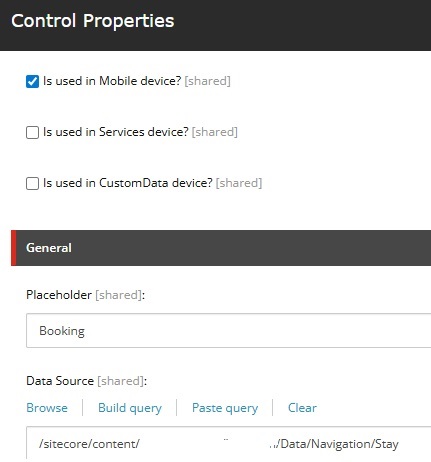
This rendering will be moved to Default device having parameter “Is Used in Mobile Device” set to true.
Conclusion
Migrating from Sitecore XP to XM Cloud requires careful consideration of architectural differences, particularly around device support. This PowerShell solution provides a robust, automated approach to preserve device-specific rendering logic while conforming to XM Cloud’s ‘Default device only’ architecture.
The script demonstrates how thoughtful parameter management and intelligent matching logic can solve complex migration challenges while maintaining the integrity of your content and user experience.
By transforming device-specific renderings into parameter-driven logic, we successfully bridge the gap between XP’s multi-device architecture and XM Cloud’s streamlined headless approach, ensuring a smooth migration path for enterprise Sitecore implementations.
 bkhandelwal.tech.blog