Creating a Sitecore Search API Crawler for Multi-Locale Content
Today, I’ll walk through how I created a Sitecore Search API crawler designed to handle multi-locale content, along with a request extractor to dynamically handle locales.
The example in the Sitecore Search documentation is great for setting up an API crawler with a trigger, request extractor, and document extractor. However, it doesn’t cover how to set up a localized API crawler that can handle multiple locales.
To achieve multi-locale support, I followed the documentation with a few additional steps. Here’s the breakdown:
Step 1: Create Triggers for Each Locale
I created multiple triggers, one per locale, by passing the language in the GraphQL query used to fetch data from Sitecore CMS.
Trigger for English (en):
{
"query":"query getRegions($language: String!,$path: String) {item(language: $language, path: $path) { id   name    children(first: 1000, includeTemplateIDs: \"{0DDC216D-7E20-46FE-929F-76B42444A239}\") {      results {   id     name      }    }  }}",
  "variables": {
    "language": "en",
	"path":"/sitecore/content/<Headless Tenant>/<Headless Site>/Home/test"
  }
}
Trigger for Arabic (ar):
{
"query":"query getRegions($language: String!,$path: String) {item(language: $language, path: $path) { id   name    children(first: 1000, includeTemplateIDs: \"{0DDC216D-7E20-46FE-929F-76B42444A239}\") {      results {   id     name      }    }  }}",
  "variables": {
    "language": "ar",
	"path":"/sitecore/content/<Headless Tenant>/<Headless Site>/Home/test"
  }
}
Each trigger simply changes the "language" parameter (e.g., "en" or "ar").
Step 2: Create a Request Extractor (Optional)
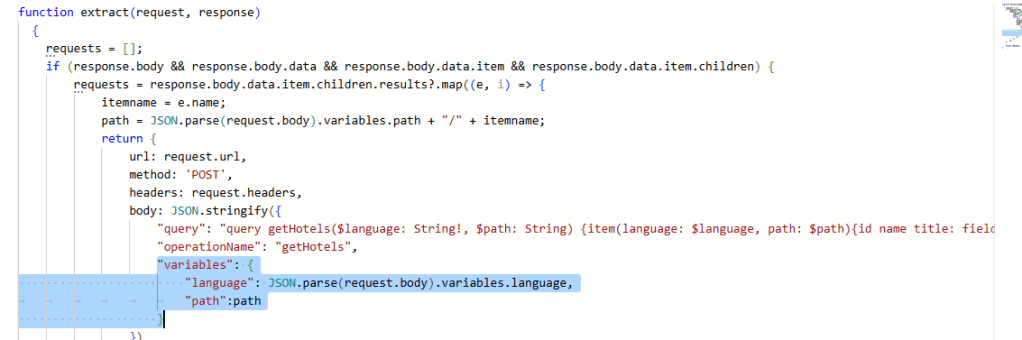
In my case, I needed a request extractor to dynamically pass the locale to the GraphQL query. I extracted the language value from the request body like this:
 "variables": {
                 "language": JSON.parse(request.body).variables.language,
		  "path":path
  }
This allows the crawler to reuse the logic regardless of the locale used in the trigger.
Step 3: Configure Available Locales
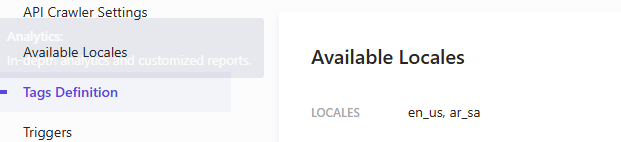
In Sitecore Search, ensure that all the supported locales are added under Available Locales in the source configuration. This step enables locale-specific indexing.
Step 4: Configure a JavaScript Locale Extractor
To properly map the language values to locale codes, I used a JavaScript locale extractor.
I extracted the language value from the request body
function extract(request, response) {
    const locales = ['ko','ms','ar','de','pt','ru','es','fr','he','id','it','nl','zh'];
    const language = JSON.parse(request.body).variables.language;

    switch (language) {
        case 'ko': return "ko-kr";
        case 'ms': return "ms-my";
        case 'ar': return "ar-sa";
        case 'de': return "nl-de";
        case 'pt': return "pt-br";
        case 'ru': return "ru-ru";
        case 'es': return "eo-es";
        case 'fr': return "fr-fr";
        case 'he': return "he-il";
        case 'id': return "id-id";
        case 'it': return "it-it";
        case 'nl': return "nl-nl";
        case 'zh': return "zh-cn";
        default: return "en-us";
    }
}
Note: Adjust mappings according to your localization standards.
Step 5: Create a Localized Document Extractor
In the document extractor configuration, I enabled the “Localized” toggle. This ensures that documents are indexed based on the extracted locale.
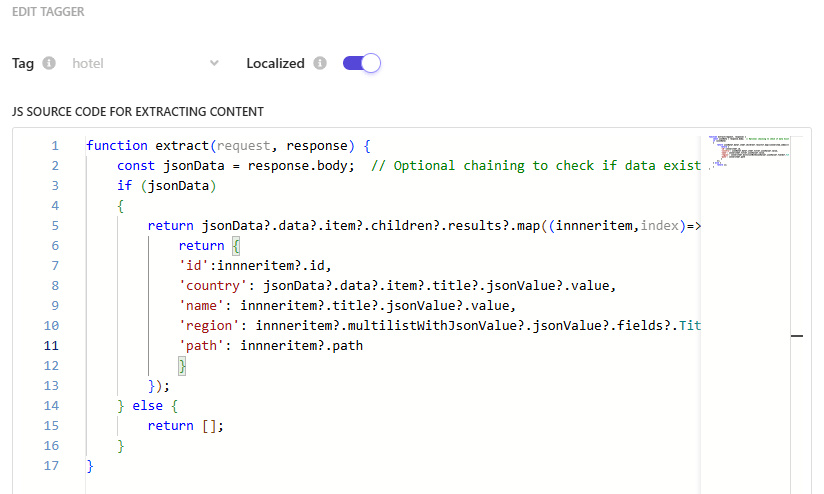
With these steps, I successfully created a Sitecore Search API crawler capable of indexing multi-locale content efficiently.
Hope this helps someone working on a similar requirement!
 bkhandelwal.tech.blog