Using Geographic Filters in Sitecore Search
Today, I’ll walk you through how I used Geographic filters in Sitecore Search to query results based on a user’s latitude and longitude.
Sitecore Search provides two types of geographic filters:
geoDistancegeoWithin
In my case, I implemented the geoDistance filter.
Step 1: Create a GEO Attribute
First, create an attribute of data type GEO.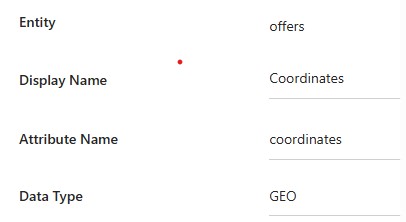
The value can be stored in different formats.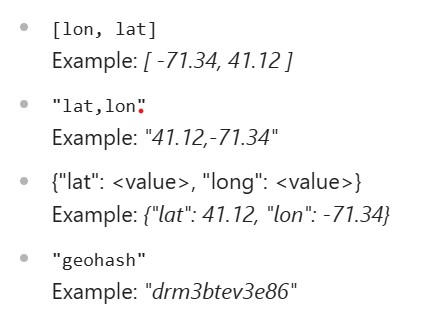
In my implementation, I stored longitude and latitude as an array of numbers using a document extractor:
let innercoordinates = [];

innercoordinates.push(parseFloat(h.longitude?.value?.trim()));
innercoordinates.push(parseFloat(h.latitude?.value?.trim()));

'coordinates': innercoordinates
Once the data is crawled, we can move on to fetching it.
Step 2: Apply the geoDistance Filter
The geoDistance filter is used to retrieve results within a circular area.
- The center of the circle is defined using
latitudeandlongitude. - The radius is defined using the
distanceparameter.
If latitude and longitude are not explicitly passed in the filter object, Sitecore Search determines them using this sequence:
- It first checks the geo context object in the request.
- If that’s missing, it tries to infer the location using the visitor’s IP address.
Here’s a sample payload with the geoDistance filter:
{
  "widget": {
    "items": [
      {
        "rfk_id": "rfkid_106",
        "entity": "offers",
        "sources": ["1160675"],
        "search": {
          "content": {},
          "limit": 50,
          "facet": { "all": true },
          "filter": {
            "type": "geoDistance",
            "name": "coordinates",
            "distance": "15km",
            "lat": 26.862471,
            "lon": 75.762413
          }
        }
      }
    ]
  },
  "context": {
    "locale": {
      "country": "us",
      "language": "en"
    }
  }
}
⚠️ While this query returned correct results, they were not sorted by distance from the provided coordinates.
Step 3: Sorting by Distance
To sort results based on the distance from the provided lat and lon, I took the following steps:
- Added sorting on the
Coordinateattribute created earlier.
- Ensured the request included:
- A geo object in the request context, containing the latitude and longitude (in decimal degrees).
- A sort object inside the request payload, specifying the API name of the sorting configuration.
Here’s the complete payload with sorting:
{
  "widget": {
    "items": [
      {
        "rfk_id": "rfkid_106",
        "entity": "offers",
        "sources": ["1160675"],
        "search": {
          "content": {},
          "limit": 50,
          "facet": { "all": true },
          "filter": {
            "type": "geoDistance",
            "name": "coordinates",
            "distance": "15km",
            "lat": 26.862471,
            "lon": 75.762413
          },
          "sort": {
            "value": [
              {
                "name": "offers_hotel_coordinate_sorting"
              }
            ]
          }
        }
      }
    ]
  },
  "context": {
    "locale": {
      "country": "us",
      "language": "en"
    },
    "geo": {
      "location": {
        "lat": 26.862471,
        "lon": 75.762413
      }
    }
  }
}
With this setup, results are not only filtered within the desired radius but also sorted by proximity to the specified coordinates.
🔑 Key Takeaways
- Use the
geoDistancefilter in Sitecore Search to query results within a defined circular area. - Always create a GEO attribute to store latitude/longitude for filtering and sorting.
- If coordinates are not passed in the filter, Sitecore Search can infer them from the geo context or the visitor’s IP.
- To sort results by proximity:
- Include the
geoobject in the request context. - Add a
sortobject that references your custom coordinate sorting configuration.
- Include the
📚 References
https://doc.sitecore.com/search/en/developers/search-developer-guide/geo.html#geolocation
https://doc.sitecore.com/search/en/users/search-user-guide/attributes.html#data-types-and-formats
 bkhandelwal.tech.blog